Upstream Authentication
Overview
Upstream Authentication secures the connectivity between the Gateway and the LLM Providers. This layer ensures secure communication and proper access control when the Gateway interacts with various AI service providers like AWS Bedrock, Azure OpenAI, Open AI, Mistral, Gemini, and other platforms.
Why Upstream Authentication Matters
Upstream Authentication is essential for several reasons:
-
Security Layer: It provides a secure authentication mechanism between the Gateway and upstream providers, preventing credentials sprawl across teams and organizations.
-
Credential Management: It allows AI platform teams to handle the secure storage and management of credentials and use them in one place. This makes the revocation and rotation of credentials easier.
-
Compliance: It helps organizations meet security and compliance requirements by maintaining proper authentication protocols and enforcing controlled usage of AI resources.
Enterprise Security Architecture
In enterprise environments, security is implemented in multiple layers:
-
Client to Gateway Authentication
- Clients must authenticate to the Gateway using appropriate methods (API keys, OAuth, etc.) aligned with the organization's security standards.
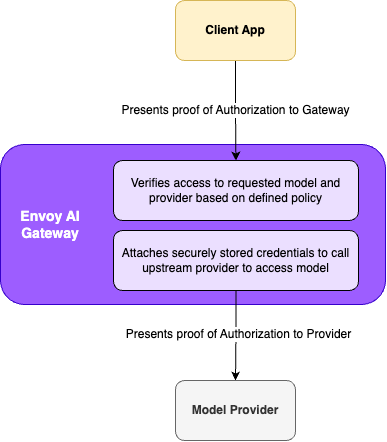
- This ensures only authorized clients can access the Gateway's services, and the Gateway enforces the access to the upstream providers and models.
tipCheck out Envoy Gateway Security Documentation for Client to Gateway security configuration options.
-
Gateway to Upstream Authentication
- The Gateway must authenticate to upstream providers.
- This layer is managed by Upstream Authentication.
- Ensures secure communication between the Gateway and AI service providers.
Credential Management
Where the providers support short lived access credentials, the Agent Router control plane supports automated credential management with the providers' identity system. This ensures a short-lived proof of authorization, such as an access token, is used when the request is sent to the upstream service.
For providers that support long lived access credentials, the Agent Router control plane supports a manual credential management process. In these cases the credentials, like API keys, are stored in Kubernetes secrets and managed by the administrator.
Automated Credential Management
The Gateway integrates with each provider's identity system to ensure secure, short-lived authentication:
- AWS Bedrock: Uses OIDC integration with AWS STS to generate temporary credentials for each request
- Azure OpenAI: Leverages Entra ID (formerly Azure AD) to provide short-lived access tokens
- GCP VertexAI: Uses GCP workload federation with Google STS to generate temporary credentials for each request
In both cases, the Gateway automatically manages these credentials, ensuring that each request to upstream providers is sent with short-lived credentials. This approach significantly reduces the risk of credential exposure and aligns with enterprise security best practices.
Learn more about connecting to AWS Bedrock and Azure OpenAI in the provider specific documentation.
Manual Credential Management
For providers that support long lived access credentials, the Agent Router control plane supports a manual credential management process. In these cases the credentials, like API keys, are stored in Kubernetes secrets and managed by the AI Gateway administrator. Agent Router will use the credentials from the secret to authenticate with the upstream service, attaching them to each request by securely retrieving them from the secret and attaching them to the request.
Learn more about connecting to OpenAI and adding your API key to the secret. You can use the same approach for other providers that support long lived credentials.
Per-Request Credential Override
By default, a BackendSecurityPolicy attaches one credential to every request. The optional
credentialOverride field instead lets a trusted filter that runs ahead of the AI Gateway
processor — typically an external authorization service wired in via ext_authz — supply the
upstream credential for each request individually. This is how a multi-tenant gateway can bill
every tenant against their own provider account while still sharing routes and backends.
The per-request credential can come from one of two sources.
From Dynamic Metadata (recommended)
The trusted filter writes the credential into Envoy dynamic metadata, and the policy names the metadata namespace to read it from:
apiVersion: aigateway.envoyproxy.io/v1beta1
kind: BackendSecurityPolicy
metadata:
  name: openai-per-tenant
spec:
  targetRefs:
    - group: aigateway.envoyproxy.io
      kind: AIServiceBackend
      name: openai
  type: APIKey
  apiKey:
    secretRef:
      name: openai-fallback-key
  credentialOverride:
    fromDynamicMetadata:
      namespace: envoy.filters.http.ext_authz
      key: x-aigw-api-key
For AWSCredentials the metadata value must be a struct rather than a string, because SigV4
signing needs the whole credential (sessionToken is optional and omitted for long-lived
credentials):
  credentialOverride:
    fromDynamicMetadata:
      namespace: envoy.filters.http.ext_authz
      key: x-aigw-aws-credentials # { accessKeyId, secretAccessKey, sessionToken }
Envoy only forwards dynamic metadata namespaces the filter chain is configured to forward. The
namespace the policy reads from must be declared in the
GatewayConfig referenced by the Gateway, under
extProc.metadataForwardingNamespaces:
apiVersion: aigateway.envoyproxy.io/v1beta1
kind: GatewayConfig
metadata:
  name: my-gateway-config
spec:
  extProc:
    metadataForwardingNamespaces:
      - envoy.filters.http.ext_authz
The declared namespaces apply to all AI traffic of the Gateways referencing the config. The list
is deliberately not derived from the policies that read it: a BackendSecurityPolicy is namespaced
and can be written by a backend owner, while what Envoy hands to the external processor is the
Gateway owner's decision. Envoy forwards exactly what that owner declared, so a policy naming an
undeclared namespace behaves as if the metadata were absent, and the controller logs an error
naming it. The declaration governs the Gateway that makes it, so attaching a route to a Gateway
cannot widen what a different Gateway forwards. An external authorization service produces the
metadata through the dynamic_metadata field of its CheckResponse.
Only untyped dynamic metadata is read. A filter that writes the credential as typed metadata
(a google.protobuf.Any under the same namespace) produces no value, and the request falls back
to the static credential or is rejected according to fallbackToConfigured.
A policy reads a namespace Envoy forwards into the processor. io.envoy.ai_gateway travels the
other way: the processor writes it and Envoy receives it, for token-based rate limiting and
access logs.
Dynamic metadata is the recommended source. Clients cannot forge it, since only filters in the gateway's own configuration can write it. And because the credential never appears as a request header, there is nothing to strip, nothing for access logs to capture, and nothing that can reach another backend on retries or fallback.
From Request Headers
Alternatively, the trusted filter can inject the credential as a request header, which the gateway reads and strips before forwarding the request to the backend it authenticated:
  credentialOverride:
    fromRequestHeaders: {} # reads x-aigw-api-key for type: APIKey
Because any client can set request headers, this source is only safe when the trusted boundary
overwrites or rejects client-supplied values of the configured header. The header also travels
with the request through the filter chain, and stripping is configured per backend — so on
routes with multiple backends (for example provider fallback), prefer fromDynamicMetadata,
which has neither exposure.
Fallback Behaviour
fallbackToConfigured (default true) controls what happens when the source carries no
credential: fall back to the static credential configured in the policy, or, when set to
false, reject the request with a 401 without contacting the provider. A partial AWS
credential — an access key ID without a secret access key, or the reverse — always fails the
request rather than falling back, since it indicates a misconfigured credential producer.
Falling back requires something to fall back to: if the policy has no static credential —
for example GCPCredentials relying on Application Default Credentials with no credentials
file or workload identity federation — the controller rejects credentialOverride unless
fallbackToConfigured: false is set explicitly.
When enabling fromDynamicMetadata on a backend already serving traffic, prefer starting with
fallbackToConfigured: true and tightening to false afterwards: the processor configuration
and Envoy's forwarding configuration are delivered on separate channels, and with false a
request that lands in between is rejected with a 401.
Conclusion
Upstream Authentication is a key component of the Agent Router's security architecture. It ensures secure communication between the Gateway and upstream AI service providers while supporting modern authentication methods and enterprise security requirements. Leverage Agent Router's Upstream Authentication to maintain a secure and compliant AI infrastructure in your enterprise environments.